How many m² does your data center need? The real calculation (not your vendor’s) for 5, 10, or 50-rack rooms
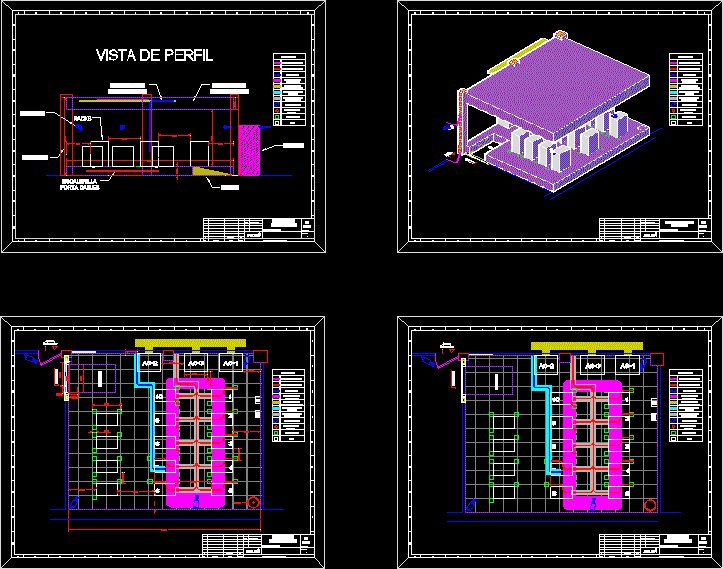
Calculating the square meters (m²) for your data center is one of the most chronically undersized decisions there is. Site providers typically give you a number smaller than the real one because they want to sell you the smallest possible space (and leave room to sell you add-ons later). The honest calculation includes rack area + service aisles + cold aisles + IDF + UPS area + generator area + technical area + 5-year growth. This article gives you the formula with worked numerical examples and the 3 typical mistakes that inflate or shrink the real number.
What follows applies to on-premise data centers (not colocation) on an office floor or in an industrial warehouse. For hyperscale or site-provider DCs, the calculation changes based on density and the operating model.
The base formula (the one your provider won’t tell you)
To calculate the square meters for your server room, add up the following components:
- Rack area (R): number of racks × 1 m² per rack (typical rack of 600×1,000 mm).
- Front service aisles: number of rows × (row length × 1.2 m). Each row has a cold aisle at the front (1.2 m minimum).
- Rear service aisles: number of rows × (row length × 1.0 m). The hot aisle is typically 1.0 m because there is less human activity.
- Side aisles between rows (if you have more than 2 rows): number of rows × (rack width × 0.3 m) per side aisle.
- IDF (Intermediate Distribution Frame): small room for patch panels and distribution switches. Typically 8–15 m² depending on the number of racks.
- UPS area: typically 8–15 m² for a modular 100–200 kW UPS. Larger for centralized UPS.
- Battery area: typically equal to or greater than the UPS area. Batteries occupy considerable volume.
- Generator area: if inside the room, typically 15–25 m² for a 250–500 kW generator. More commonly in a separate room or outdoors.
- CRAC/CRAH area: typically 2–4 m² per unit × number of units. If you have 3 CRACs, that’s 6–12 m² additional.
- 5-year growth: 20–30% additional on top of the calculated total. This is what the provider NEVER includes in its initial quote.
The complete formula: Total area = R + Aisles + IDF + UPS + Batteries + Generator + CRAC + (20–30% × total)
Example: 10-rack room on an office floor
Typical configuration: 2 rows of 5 racks each, 30 kW UPS, 1 CRAC, no generator inside the room.
- Rack area: 10 × 1.0 = 10 m².
- Front aisles: 2 rows × (5 racks × 1.0 m wide × 1.2 m aisle width) = 2 × 6 = 12 m².
- Rear aisles: 2 rows × (5 × 1.0) = 10 m².
- Side aisles: 1 aisle × 1.0 m × 5 m long = 5 m².
- IDF: 8 m².
- UPS: 6 m².
- Batteries: 8 m².
- CRAC: 4 m².
- Subtotal before growth: 63 m².
- Growth 25%: 16 m². Largest section for the final calculation.
- TOTAL: 79 m². Round up to 80–85 m² as a minimum for your room.
The provider will tell you that you need 40–50 m² for 10 racks. They are leaving out IDF, UPS, batteries, CRAC, and growth. If you accept the 50 m², you’ll be cramped from day one with no room to grow.
Example: 50-rack room in an industrial warehouse
Configuration: 5 rows of 10 racks, 200 kW UPS, 3 CRACs, larger IDF, dedicated battery area.
- Rack area: 50 × 1.0 = 50 m².
- Front aisles: 5 rows × (10 × 1.0 × 1.2) = 60 m².
- Rear aisles: 5 rows × (10 × 1.0) = 50 m².
- Side aisles: 4 aisles × 1.0 × 10 = 40 m².
- IDF: 15 m².
- UPS: 12 m².
- Batteries: 18 m² (lithium-ion, more compact than VRLA).
- CRAC: 3 × 4 = 12 m².
- Subtotal: 257 m².
- Growth 25%: 64 m².
- TOTAL: 321 m². Minimum 320–350 m² for your room.
The provider will tell you 180–220 m² for 50 racks. They’re short by 100+ m². When your DC is in operation, you’ll realize you need to fit IDF, UPS, batteries, and a technical room where nothing else fits.
The 3 typical mistakes in the calculation
What’s typically done wrong:
- Only counting the rack area. The most common error. It forgets aisles, IDF, UPS, CRAC. Result: a room 30–50% smaller than needed.
- Not including 5-year growth. Providers never include it because it cuts their margin on the initial quote. But if you don’t account for growth, in 3 years you’re moving DCs.
- Assuming 0.8 m aisles when the standard is 1.2 m. Narrow aisles save space but prevent free passage or maneuvering by technical staff. In a hot aisle it’s 1.0 m minimum, in a cold aisle 1.2 m minimum.
The 3 mistakes compound. A room quoted at 50 m² with all 3 typical mistakes ends up being insufficient to operate with 5 racks instead of the planned 10.
When you need more space than you thought
There are 3 scenarios where the base calculation falls short:
- High density (>10 kW per rack). You need containment aisles (panels or ceilings over cold aisles), which take 0.3–0.5 m additional per row.
- You need 2N redundancy (not N+1). You double the UPS and CRAC area.
- 24/7 operation with in-house staff. You need work area, lockers, restroom for operators. Typically 15–25 m² additional.
If your DC falls into any of these 3 scenarios, multiply the base calculation by 1.3–1.5 before applying growth.
When you can use less space than calculated
There are also 3 scenarios where the calculation shrinks:
- DC with 800×1,000 mm racks instead of 600×1,000 mm. The density per rack is higher, so you need fewer racks for the same equipment. But each rack occupies 0.8 m² instead of 0.6 m², so the total area can go up or down depending on the case.
- 100% remote operation (no staff on site). You don’t need work areas or restrooms for operators. The savings is 15–25 m².
- UPS and batteries in a separate room. If you can take UPS and batteries out of the main room (into a separate electrical room), you save 15–25 m² in the server room.
These savings apply when you have the architectural flexibility to separate the spaces. In retrofits (DC on an existing office floor), it’s typically not possible and you have to accept the base calculation.
How to verify your provider’s calculation
When you receive a quote for DC space from your provider, ask 4 questions:
- Does the quoted area include IDF, UPS, batteries, and CRAC? If it only includes racks and aisles, they’re undersizing you by 30% to 60%.
- Does the calculation include 5-year growth? If not, add 25% to the number they give you.
- What is the quoted aisle width? If it’s less than 1.2 m in a cold aisle, it’s not functional. Ask for an adjustment.
- Is there any dedicated technical area (electrical room, secondary IDF, staging area for new equipment)? If it’s not on the floor plan, you don’t have it.
If the provider doesn’t answer these questions in detail, they don’t know what they’re selling. The conversation with a serious provider about square meters is technical, not commercial.
How to present the calculation to your CFO or leadership
The CFO is going to ask why the number is bigger than the provider’s. Your answer:
- The provider’s calculation only includes rack area + aisles. It’s missing IDF, UPS, batteries, CRAC, and growth.
- If we accept the provider’s short calculation, in 2–3 years we’ll have to expand or move. The cost of a retrofit or move is typically 3–5x the cost of building with enough margin from the start.
- The calculation includes 25% growth over 5 years. That’s the industry standard (TIA-942-B recommends 20–30%). If you want to save, we can discuss reducing growth to 15%, but with the risk of falling short before the 5 years are up.
The CFO will understand the argument when you frame it in terms of 5–10 year total cost of ownership, not just initial CAPEX. The question isn’t ‘how much does the square meter cost?’ but ‘how much does it cost us to fall short?’
Sources
- TIA-942-B-2023 — https://www.tia.org/standards/tia-942
- ASHRAE TC 9.9 — https://www.ashrae.org/technical-resources/bookstore/thermal-vigilance-for-data-processing-environments
- BICSI 002-2024 — https://www.bicsi.org/standards/data-center
- Uptime Institute — https://datacenter.uptimeinstitute.com/
- ANSI/TIA-942-B — https://www.tia.org/standards/tia-942
Want to master this?
Noxtel Academy →