How to authorize secure access to a remote hand in your data center: the 5-step protocol your site provider will demand

When you contract a remote hands service, you hand physical and logical access to your data center to people who are not your own staff. The question is not ‘whether to trust them’ — the question is ‘what controls you put in place so trust does not depend solely on their good faith’. This article covers the 5-step protocol to authorize secure accesses: identity validation, tool scanning, remote escort, operation log, and time-boxing. Why providers push back on it (because it costs them time and that is why they sell it to you as ‘operational flexibility’) and why you should insist.
The protocol applies to any data center with a contracted remote hands provider. The exact implementation varies depending on the applicable compliance (PCI DSS, SOC 2, HIPAA, ISO 27001) but the principles are universal.
Step 1: Identity validation BEFORE the visit
Before the remote hand reaches your site, you must validate exactly who they are:
- Valid official identification (national ID, passport, professional license). Digital copy that the provider delivers 24 hours in advance.
- Letter on the provider company’s letterhead authorizing the specific technician to act on your behalf. With: full name of the technician, the provider’s internal identification number for them, date of intervention, scope of work, ticket number.
- Verification with the provider through an independent channel. When you receive the letter, you call the provider at the known public number and confirm the technician is assigned to your ticket. This prevents corporate identity spoofing.
- Background check. For data centers with strict compliance (PCI DSS, SOC 2 Type II), require the provider to deliver a clean criminal background letter for the technician. This is the provider’s, not yours, but you must require it contractually.
A provider who refuses to deliver a letterhead letter or cannot verify through an independent channel has an internal operational problem. That is a data point to reconsider the contractual relationship.
Step 2: Tool and equipment scanning on entry
When the remote hand arrives at your site, scan everything they bring:
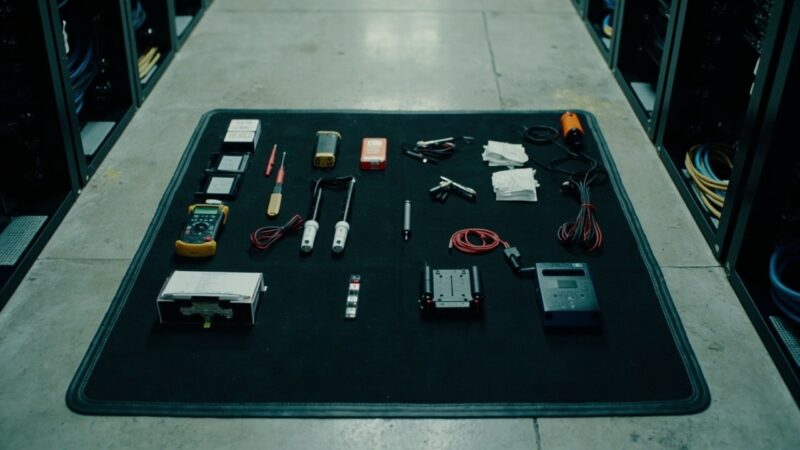
- Tools: declared list vs physical list. The remote hand declares what tools they bring (multimeter, screwdriver, labeler, laptop, etc.). Your site’s operator verifies that what was declared matches what is physical.
- Electronic devices: laptop, smartphone, USB drives, external disks. List with brand, model, serial number. Undeclared devices are prohibited from entry.
- Bags and backpacks: visual check by your DC operator. The remote hand does NOT enter the DC with a bag; they leave their belongings in visitor-designated lockers.
- Photo of all equipment on entry. With timestamp. The photo is archived with the ticket. If there is a security incident later, you have evidence of what entered the DC.
99% of remote hands are legitimate and present no risk. But the 1% that does represent a risk is exactly the one that does not want to go through scanning. If a technician refuses scanning, escalate immediately to the provider and suspend the intervention.
Step 3: Remote escort during the intervention
The remote hand must NEVER operate alone in your DC. The escort is your on-site guarantee that the work is executed as agreed:
- Physical escort (your DC operator or security personnel) during the entire intervention. The escort observes without intervening — they do not tell the remote hand how to do their job, only verify they follow the protocol.
- Escort has authority to stop the intervention if they observe something suspicious (opening unauthorized cabinets, connecting undeclared devices, photographing equipment without authorization).
- Escort documents with timestamps every action of the remote hand: start time, every slot/rack/equipment change, end time. This local log is cross-checked against the remote hand’s log.
- For small DCs without permanent staff, the ‘escort’ can be a trained security guard or facilities personnel. What is NOT allowed is a remote hand with nobody from your organization present.
The provider’s argument against it: ‘it raises the service cost because I have to wait for your staff’. Your response: ‘the cost of an unaccompanied intervention that goes wrong (data theft, unauthorized device installation, physical damage) is 100-1000x the cost of having your operator present’.
Step 4: Operation log with digital signature
Digital documentation of the entire operation:
- Log in digital format (not paper) that records: entry time, start time, every action with timestamp, equipment worked on with serial number, number of slots affected, end time, exit time.
- Technician’s digital signature on completion. Ticket systems with digital signature (DocuSign, Adobe Sign, or the provider’s internal system) are valid.
- Signature of your DC escort confirming that the work was executed as agreed.
- Storage for a minimum of 5 years. If you have SOC 2 compliance, this is the minimum time. For PCI DSS, up to 12 months online + indefinite archiving.
The log is your evidence if there is a later dispute about what the remote hand did. Without a log signed by both parties, the provider’s version is the only one that remains. That puts you at a disadvantage in any litigation or billing dispute.
Step 5: Time-boxing the intervention
Every intervention must have a maximum authorized time:
- Pre-agreed time window in the ticket. Typical 30 minutes for a simple ticket, 2-4 hours for rack & stack, 8 hours for a major installation.
- If the intervention exceeds the window, mandatory escalation. The remote hand must report to the provider and the client BEFORE continuing. If they need extra time, there must be explicit approval (verbal or written) from the client-side responsible.
- Absolute maximum time per individual intervention: 8 hours. Longer interventions require multiple tickets or additional staff. Nobody is healthy for 12+ continuous hours in your DC without supervision.
- Log of hours worked per technician per visit. For compliance auditors, it is evidence that there was no excessive exposure.
Time-boxing avoids the scenario where a remote hand ‘is working’ but is really mapping the site, photographing equipment, or identifying attack points. Legitimate work has an expected duration. If it is exceeded without justification, there is a problem.
The additional protocol for data centers with strict compliance
If your DC is subject to PCI DSS, SOC 2, HIPAA, or ISO 27001, add:
- Two-factor authentication (2FA) for logical access. The remote hand needs a physical token or TOTP app to access the production system.
- Continuous video recording during the intervention. Your DC must have CCTV covering every area where the remote hand operates.
- Escort with explicit authority to stop the intervention for compliance violation (not only for physical security).
- Automatic incident report if the remote hand attempts to access equipment not listed in the ticket. Your ticket system must generate an alert when there is an attempt to access out of scope.
These additional controls cost more (CCTV, ticket system with alerts, compliance personnel) but they are mandatory if you operate under any of these regulatory frameworks. Auditing without them is finding deficiencies in every audit.
How to present the protocol to your provider
The provider will push back. Your commercial argument:
- ‘It is not negotiable; it is a requirement of our compliance. If your current provider does not accept, I will find another.’
- ‘The additional cost per intervention is marginal (5-10% more), but the insurance coverage and legal protection are exponentially better.’
- ‘If there is an incident, our cybersecurity policy does NOT cover if we do not have this protocol documented.’
- ‘The end client (SOC 2 / PCI DSS audited) requires this level of control. If you do not apply it, we lose the client.’
A mature provider accepts the protocol without resistance because they already apply it with other enterprise clients. The one that resists is because their internal operation cannot sustain it (unregulated technicians, lack of digital-signature ticket system, etc.).
When your protocol must be even stricter
There are scenarios where the 5-step protocol is not enough:
- Data centers that process financial transactions (PCI DSS Level 1). The protocol must include a security escort with specific clearance, not just any operator.
- Data centers that store sensitive personal data (health, financial, biometric). HIPAA or equivalent. The protocol must include a non-disclosure agreement signed by the individual technician, not only by the provider.
- Government or critical-infrastructure data centers. The protocol must include security clearance for the technician (deep background investigation, not only a clean background letter).
- Data centers that have suffered a recent security incident. The protocol must include a surprise audit of the intervention, not only the prior planning.
In these scenarios, the service cost rises 30-50% but that is the price of operating with the due diligence that the regulatory framework requires. Operating without it exposes you to fines, loss of certification, and reputational damage that costs much more.
The most common mistake: trusting the SLA without verifying the protocol
Data centers that end up in contractor incidents almost always share the same characteristic: they had an excellent SLA with 15-minute response and 1-hour resolution times, but they did NOT have an access protocol. The SLA covers time, but the protocol covers what happens during that time.
Your CFO will ask why pay 20% more for a protocol that the provider did not require. Your answer: ‘Because when the incident happens (it is not if, it is when), the difference between having the protocol documented and not having it is the difference between insurance coverage and a lawsuit. 20% more in the service vs. possible bankruptcy if there is a massive incident — the math is simple.’
The 5-step protocol is not paranoia or bureaucracy. It is the operational standard practice of mature data centers. If your provider tells you it is exaggerated, that is a good sign that you need a different one.
Sources
- ISO/IEC 27001:2022 — https://www.iso.org/standard/27001
- PCI DSS v4.0 — https://www.pcisecuritystandards.org/document_library
- SOC 2 Type II — https://www.aicpa.org/topic/soc-2-reporting
- HIPAA Security Rule — https://www.hhs.gov/hipaa/for-professionals/security/laws-regulations/index.html
- BICSI 002-2024 — https://www.bicsi.org/standards/data-center
Want to master this?
Noxtel Academy →