In-row vs perimeter cooling: which fits your small or mid-sized data center (4 criteria that separate the right decision from the wrong one)
When you design cooling for a 5-to-50-rack data center, the in-row vs perimeter decision is one of the most underestimated. The vendor will sell you whatever they have in inventory or whatever gives them the highest margin. The correct decision rests on 4 objective criteria: load density, available CAPEX, scalability over 3-5 years, and acceptable in-room noise level. This article covers the 4 criteria, the 2 typical scenarios where each option wins, and the design mistakes that cost dearly when you choose wrong.
What follows applies to on-premise data centers of 5 to 50 racks. For hyperscale DCs (>200 racks), the discussion shifts because other technologies get involved (rear-door heat exchangers, direct liquid cooling, immersion). The 5-to-50-rack range is where the in-row vs perimeter decision is most relevant and least obvious.
What each one is (without vendor jargon)
Before comparing, we need operational definitions:
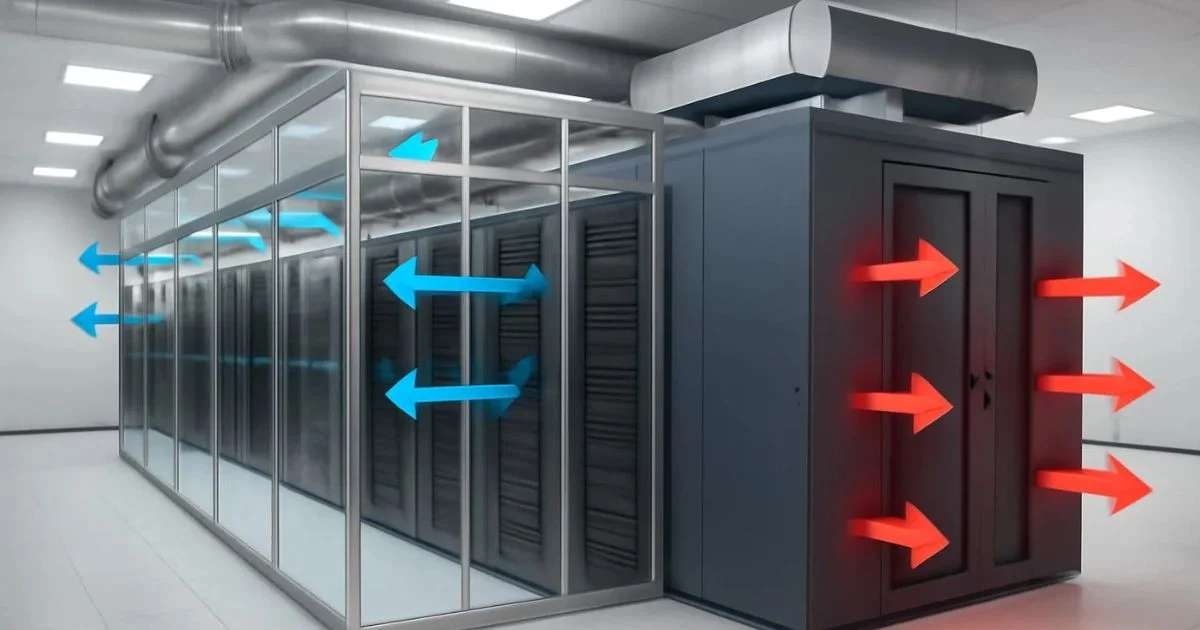
- Perimeter cooling: CRAC or CRAH units sit along the perimeter of the room (walls), pushing cold air toward the center. Air travels from the perimeter to the racks passing through the whole room. Return happens through hot aisles at the center or the opposite perimeter. Classic distribution from the 1990s-2000s.
- In-row cooling: units sit physically BETWEEN rack rows, in the same cold aisle. Each unit cools the adjacent row directly. Cold air exits the unit, enters the cold aisle, and distributes to the racks in that row. Modern distribution from the 2010s onward.
The operational difference is large: in perimeter cooling, air travels long distances (typically 6-10 meters) before reaching the rack. In in-row, air travels less than 1 meter. This directly impacts energy efficiency (PUE) and cooling capacity.
Criterion #1: Load density per rack
The most decisive criterion. Typical data center densities:
- Low density: 3-5 kW per rack. Typical in switch, router, and basic server racks. Loads from the 2000s. Total room: up to 100 kW for 20-30 racks.
- Medium density: 5-10 kW per rack. Typical in racks with modern blade servers and storage. Total room: 100-300 kW for 20-30 racks.
- High density: 10-25 kW per rack. Typical in racks with GPU servers, AI training, HPC. Total room: 250+ kW for 20-30 racks.
Recommendation by density:
- Low density (3-5 kW): PERIMETER works well. Air travel distance is acceptable, no hot spots. Lower CAPEX.
- Medium density (5-10 kW): IN-ROW is already becoming necessary. Perimeter can handle this load but requires more units, more redundancy, and consumes more.
- High density (>10 kW): IN-ROW IS MANDATORY. Perimeter cannot keep up, hot spots appear. If you are in this range, you should already be evaluating direct liquid cooling.
If your average rack sits between 5 and 10 kW, you are in the range where the in-row vs perimeter decision is 50/50 by density alone. The other criteria weigh more.
Criterion #2: Available CAPEX
Perimeter is cheaper up front. Typical 2025-2026 comparison for a 20-rack room at 5 kW per rack (100 kW total):
- Perimeter: 2 CRAC units at 60 kW each (with N+1 redundancy), air ductwork if applicable, installation. CAPEX: MXN $280,000-450,000.
- In-row: 3-4 in-row units at 30 kW each (with N+1 redundancy), no air ductwork. CAPEX: MXN $450,000-700,000.
Perimeter costs 30-50% less up front. But perimeter OPEX (electrical consumption) is 15-25% higher because of air travel distance. Break-even lands between 4-7 years depending on local electricity tariff.
If your CFO evaluates CAPEX over 3 years, perimeter wins. If they evaluate TCO over 10 years, in-row can win. The question to ask your CFO: ‘Are we optimizing initial CAPEX or total cost of ownership over 10 years?’
Criterion #3: Scalability over 3-5 years
This is where in-row clearly wins. The operational difference:
- Perimeter to grow: you need to add more perimeter units (typically replacing existing ones with larger units). Ductwork may become undersized. Reconfiguration is major.
- In-row to grow: add another in-row unit in another rack row. No ductwork changes. No layout reconfiguration. Installation time: 2-4 hours per unit.
If your growth plan goes from 20 to 40 racks in 3 years, in-row is clearly the right decision. Operational flexibility pays back the initial CAPEX premium in the first year of growth.
If your operation is stable (you don’t plan to grow more than 10% over 5 years), perimeter is sufficient. The right decision depends on your business plan, not just on DC engineering.
Criterion #4: In-room noise level
An underestimated criterion. Cooling unit noise directly affects operator comfort and in-room communication:
- Perimeter: typically 65-75 dB at 1 meter from the unit itself. Units sit on the perimeter, the operator is in the center of the room, separated from the units. Perceived level: 50-60 dB in the rack zone.
- In-row: typically 70-85 dB at 1 meter from the unit. Units sit IN the cold aisle where the operator works. Perceived level: 60-80 dB in the rack zone.
If you have technical staff in the room for more than 2 continuous hours (24/7 operation with in-house staff), in-row requires mandatory hearing protection (NRR 25+ dB). Perimeter allows unprotected operation most of the time.
Noise also affects operator concentration. A DC with in-row and staff working 8+ hours has higher staff turnover from auditory fatigue. If your operation is unattended or runs with minimum staff, in-row is viable.
The 2 typical scenarios where each one wins
Synthesis for the most common cases:
- SME with 5-15 racks, medium-low density, limited budget, no permanent technical staff, stable growth: PERIMETER.
- Mid-sized company with 20-50 racks, medium-high density, sufficient budget, with technical staff, significant growth plan: IN-ROW.
If your case falls between these two, the deciding factor is usually available CAPEX. If you have budget, in-row. If not, perimeter. Perimeter is not ‘bad’ — it is ‘different’.
Common mistakes when choosing
The 4 mistakes that cost dearly:
- Choosing perimeter for medium density thinking ‘that is how it has always been done’. Result: high heat concentration, recurring hot spots, high OPEX.
- Choosing in-row for a small room (<10 racks) thinking it is 'more modern'. Result: over-CAPEX, undersized units, excessive noise for a small room.
- Mixing perimeter and in-row in the same room. Result: conflicting air flows, one unit ‘pushes’ against the other, efficiency drops.
- Not planning for scalability. Choosing perimeter because ‘right now’ it works, without considering that in 3 years you will need 30% more capacity. Migrating from perimeter to in-row in operation is disruptive and expensive.
The most expensive mistake is #4. When you design thinking only about the present, you pay for the bad decision 2-3 years later with a forced migration. Better to pay 20% more up front for the solution that scales.
When perimeter is still the right answer
There are scenarios where perimeter is clearly the right decision even with budget available:
- Data center on the upper floor of an office building. Weight, vibration, and ductwork constraints make perimeter more viable. In-row requires a wide raised floor, which is not available in offices.
- Data center with an existing overhead air duct system already installed. Migrating to in-row means abandoning the existing duct — a significant sunk cost.
- Very low density operation with plans to close in 5 years. If you are going to close the DC, the in-row CAPEX premium is not justified.
These scenarios are more common than they seem. Perimeter is not obsolete; it is a current solution for specific contexts.
When in-row falls short
There are also scenarios where in-row is not enough:
- Very high density (>25 kW per rack). Air can no longer keep up; you need direct liquid cooling or rear-door heat exchangers.
- Room with very narrow aisles (<1.2 m). In-row requires space between rows, you cannot compress further.
- Shared-site operation where noise causes complaints from neighbors. In-row at 80+ dB is problematic in residential contexts.
If your case is in these ranges, it is no longer in-row vs perimeter, it is another technology tier. The right decision is liquid cooling or rear-door.
How to present the decision to your CFO
Your CFO will ask: ‘Why not the cheapest?’ Your response:
- The cheapest today (perimeter) has 15-25% higher OPEX and limits growth. If we plan to grow from 20 to 35 racks in 3 years, perimeter costs more in TCO.
- In-row costs 30-50% more up front but has lower OPEX and operational flexibility. If we stay at 20 racks for 7+ years, perimeter is better.
- The question is not ‘how much does it cost today’ but ‘how much does it cost over 5-10 years of operation’. The answer depends on the business plan.
- If the CFO approves perimeter due to budget constraints, that is fine. It is a valid decision. But they must understand they are accepting less future flexibility.
The CFO who understands TCO over 5-10 years approves in-row. The one who only sees initial CAPEX approves perimeter. Your job is to give them the full information so they make an informed decision — not to convince them of one or the other.
Summary: the decision tree
Simplified tree to reach the decision:
- Is density >10 kW per rack? Yes → IN-ROW (or liquid cooling).
- Is density <5 kW per rack? Yes → PERIMETER.
- Is density 5-10 kW? Consider criteria #2, #3, #4.
- Is growth plan >30% in 3 years? Yes → IN-ROW. No → PERIMETER.
- Is CAPEX budget limited? Yes → PERIMETER. No → IN-ROW if growing, perimeter if stable.
If after applying the 4 criteria you are still undecided, consult an independent DC designer (not with an equipment vendor, who has a conflict of interest). The designer charges MXN $50,000-150,000 for the consulting engagement, but it saves you MXN $200,000-500,000 in the wrong decision.
Sources
- ASHRAE TC 9.9 — https://www.ashrae.org/technical-resources/bookstore/thermal-vigilance-for-data-processing-environments
- TIA-942-B-2023 — https://www.tia.org/standards/tia-942
- BICSI 002-2024 — https://www.bicsi.org/standards/data-center
- Vertiv — https://www.vertiv.com/en-us/products/brands/liebert/
- Schneider Electric — https://www.se.com/mx/es/product-category/data-centers/
Want to master this?
Noxtel Academy →