What Remote Hands CAN Do and What You Should NEVER Delegate (the Line Your Provider Won’t Mark for You)
You hire remote hands and the provider tells you “yes, we do that, don’t worry”. The question you should be asking is: which specific tasks am I authorizing to a person who is not part of my staff, who does not report to my CISO, and who has physical access to my servers? This article is not about the generic catalog. It is about where the exact line sits between what you can delegate with confidence and what you should NEVER delegate even if the provider tells you yes, because it has an SLA, because it has certifications, or because it offers a discount.
The split that follows applies to data centers with on-site field staff (colocation, site provider, or your own DC with subcontracted field technicians). If your operation is 100% remote with no physical presence at the site, this article is still valid but with fewer options on the YES side.
What You CAN Delegate to Remote Hands (With Operational Confidence)
They are physical, repetitive, auditable tasks with low risk of affecting availability. A competent remote hand, with a proper briefing, can execute them without your team intervening:
- Rack & stack of new equipment: receiving boxes, unpacking, racking, labeling ports and patch cables. The prior briefing must include the specific U slot, the torque of the rack screws (typically 8-12 in-lbs for cage nuts), and the order of the network cables.
- Hot-swap hard disk or SSD replacement: if your storage array is in fault-tolerant RAID, the swap is trivial. The remote hand needs the label of the disk to be replaced (serial, slot, part number) and a 30-second before/after video. If the array is NOT fault-tolerant, consider that a failed disk can take down the whole array if the remote hand pulls the wrong disk.
- Swap of redundant power supplies: if your server has 2 PSUs in 1+1 redundancy, a remote hand can replace the failed PSU without affecting operations. Briefing: confirm that the remaining PSU supports the equipment (check current draw vs capacity), power down the failed PSU before removing it, wait 30 seconds for capacitor discharge before removing the cable.
- RAM memory module replacement: only if the server has empty slots and the operation is well documented. The remote hand must receive the specific slot number (not “one more memory stick”) and the exact brand/model. Risk: if the memory is not identical to the existing one, there may be incompatibility or it may force the bus to a lower speed.
- KVM or serial console cable connection for out-of-band access: the remote hand plugs the cable in, you take remote control. The remote hand should never type commands in your session, only make the physical connection.
- Physical labeling of cables, racks, and ports: if you have a labeling standard (TIA-942-B recommends 4-character alphanumeric codes per port), the remote hand can apply labels, photograph before/after, and deliver a final map.
- Visual inspection of equipment: abnormal LED blinks, dust on equipment filters, liquid stains, loose cables. Photographic report with timestamp + rack U coordinates.
- Reading of displays and meters: CRAC return air temperature, relative humidity, filter pressure, UPS voltage, battery status. Without touching anything, only reading and reporting.
- Handling of passwords, SSH keys, or API tokens: the remote hand should never type credentials on your equipment. If your site provider requires you to give them access to the BIOS or to the iLO/iDRAC to boot a server, you have an architecture problem, not a remote hands problem. The solution is KVM over IP with permissions on your side, not shared credentials.
- Network configuration changes: adding VLANs, moving ports between VLANs, modifying ACLs, touching routing tables. A poorly applied VLAN change can isolate a server or, worse, expose an internal service to the Internet. You make these changes yourself with out-of-band remote access, not on site.
- Physical access to storage media with sensitive data: if you need to replace a disk that holds encrypted data, or plaintext data that you need destroyed, the remote hand should witness but not manipulate the medium without your presence or a recording. Compliance: SOX, HIPAA, GDPR/LFPDPPP have specific requirements on media destruction that are hard to meet without your direct participation.
- Firewall, VPN, or logical access control configuration: any change to the attack surface of your infrastructure. The remote hand should not have access to security management interfaces or to firewall consoles. These are changes that your security team approves and executes, not third parties.
- Forced restart of production equipment: if a server does not respond and you need to restart it, the remote hand can press the power button ONLY with explicit real-time authorization (not with a ticket opened the day before). And it must document: exact timestamp, reason, who authorized it, and a 10-second before/after video.
- Handling of core or distribution switches: any physical change to switches that carry production traffic. The remote hand can swap an SFP transceiver or replace a switch in fail-over, but should not touch configuration or trunk cables between switches without your presence.
- Access to physical storage vaults or safes: if you have a vault or a safe for offline SSH keys, root passwords, or recovery tokens, the remote hand should NOT have access. Period.
- Diagnosis of complex failures: if the ticket says “server X is not responding”, the remote hand should NOT start swapping components at random to “see if it works”. The diagnosis is yours; the remote hand executes the specific action you indicate based on your diagnosis.
- Annex A: numbered list of delegable tasks (those from the first section of this article, adjusted to your specific equipment).
- Annex B: numbered list of prohibited tasks (those from the second section).
- Authorization procedure: every task outside Annex A requires a ticket with real-time authorization (via Slack, Teams, phone call, or ticketing system) from a specific person on your team. The remote hand documents: ticket ID, authorization time, who authorized it, photographic evidence.
- Rollback procedure: every task the remote hand executes must have a documented rollback path. If it was replacing a disk, how do you get back to the previous state? If it was labeling cables, what was the previous labeling? The remote hand documents the previous state with a photo before touching anything.
- Incident procedure: if something goes wrong during execution, the remote hand stops, contacts you through the primary channel, and waits for instructions. It does not improvise. The incident response SLA (not the scheduled work SLA) should be a maximum of 15 minutes to confirm communication.
- Quarterly review: every 3 months you and the provider review the SOA, the incidents of the quarter, and adjust if there are recurring tasks that should move from prohibited to delegable or vice versa.
- Willing to sign an SOA with specific lists of authorized and prohibited tasks. If it says “it depends on the case”, it is an improvised provider.
- Technicians certified by at least one major manufacturer (Vertiv, Schneider, HPE, Dell, Cisco). Certification is a signal that the provider invests in formal training.
- Documented and measured response time: for urgent tickets, a maximum of 2 hours. For scheduled tickets, within the agreed window (typically 24-48 business hours).
- Reports generated with timestamp, photos, instrument readings, and the technician’s signature on each visit. The report should not be generic.
- Professional liability insurance that covers operational errors. If your provider causes damage through poor execution, the insurance pays. If it has no insurance, your incident is yours.
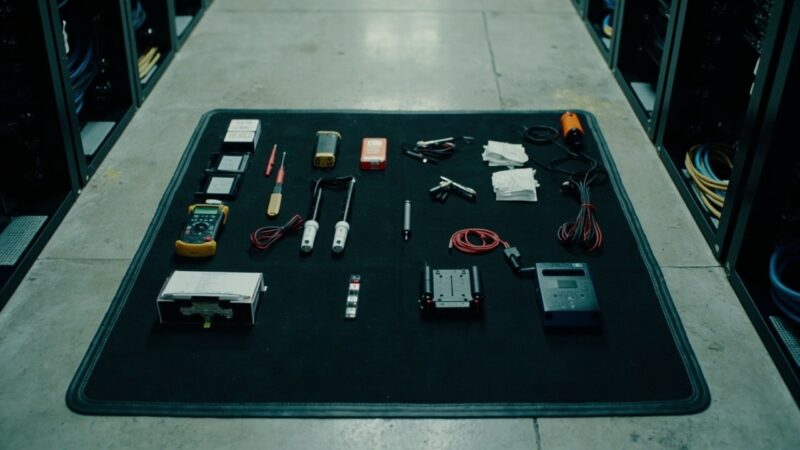
- Documented tool kit provided. If it tells you “the technicians bring their own tools”, ask which ones. The list of 12 tools in the standard remote hands kit (multimeter, torque screwdriver, label printer, USB boot, etc.) I published on this blog and it should be the minimum.
- TIA-942-B-2023 — Telecommunications Infrastructure Standard for Data Centers (ANSI/TIA-942-B-2023) — https://www.tia.org/standards/tia-942
- Uptime Institute — Operational Sustainability Tier Certification: Smart Hands scope definition — https://datacenter.uptimeinstitute.com/
- SOC 2 Type II — Common criteria for service organizations (AICPA Trust Services) — https://www.aicpa.org/topic/soc-2-reporting
- ISO/IEC 27001:2022 — Information security controls for physical and logical access — https://www.iso.org/standard/27001
- BICSI 002-2024 — Data Center Operations and Maintenance Best Practices — https://www.bicsi.org/standards/data-center
The common rule: if the task is mechanical, repetitive, reversible, and does not touch credentials or logical configuration, it is delegable. The remote hand should never type commands on your equipment, should never hold passwords, and should never make decisions about what to do when something does not go as expected.
What You Should NEVER Delegate (Even If the Provider Says Yes)
There are tasks that, by their nature, open risk vectors that do not close on their own just because of an SLA. If you delegate them, the resulting incident will be yours, not the provider’s, no matter what the contract says:
The common rule: if the task touches credentials, logical configuration, or requires judgment about what to do when something does not go as planned, it is NOT delegated. The remote hand executes specific instructions, it does not solve open problems.
How to Document the Agreement So It Works in Practice
If your remote hands provider is serious, it will accept a written SOA (Standard Operating Agreement) with the exact list of authorized and prohibited tasks. If it does not accept one, you have a provider that will later tell you “that was not in the contract” when something goes wrong. How to structure it:
If your current provider does not accept this level of detail, you have two options: change providers, or accept that every ticket will be a negotiation. The second option is unsustainable when you have a real incident in production and you need the remote hand to execute fast and without ambiguity.
The Real Case Nobody Tells You: What Happens When the Line Gets Crossed
In 2024, at a mid-sized Mexican site, a remote hand was instructed by a ticket opened 3 days earlier to “replace the memory module of server X”. The ticket said “memory module” without further detail. The remote hand arrived at the rack, opened the server, and removed a memory module from the wrong slot. Result: the server, which was in production, went down because it had 4 DIMMs in pairs and removing one broke the pair. Downtime: 3 hours. The root cause was not the remote hand. It was the ambiguous briefing in the ticket. The correct memory was in my box. The remote hand did what it could with the information it was given.
Operational lessons from that incident: (1) remote hands tickets must include exact U coordinates and slot number, not “the server’s memory”; (2) the briefing for delicate tasks must be verbal and in real time, not asynchronous; (3) if your server has memory configured in pairs, you make RAM changes yourself over KVM over IP, not on site.
How to Choose a Provider If You Are Starting From Scratch
If you do not have a remote hands provider and you are about to hire one, the objective filters:
The line between “I can delegate” and “never delegate” is not fixed. It evolves with your team, with your provider, with the operational maturity of your DC. What should not evolve is the discipline of having it documented in writing and reviewed quarterly. The day you need it clear is not the day to negotiate it.
Sources
Want to master this?
Noxtel Academy →